24/7 support desk +971 50 402 6064 info@myservicepartner.net WhatsApp
MyServicePartner – Connecting Skills, Bridging Borders
Home / PartnerOne

PartnerOne

One app for service, customers & sales FSM + CRM

PartnerOne runs your whole service business in one place – from the first customer call to the signed job report, the AMC visit and the next quotation. Office, technicians and management work on the same live data, on any phone or PC.

Cloud basedPhone, tablet & PCLive updatesGPS & photosYour own logoMulti-company
PartnerOne · Office dashboard Dashboard TicketsScheduleCustomersAMC / PPMQuotationsStaffReports Open tickets18 On site now7 Closed today12 PPM due5 Today's schedule #1048 · CCTV not recordingRaviClosed #1049 · Access door offlineAnilOn site #1050 · AMC visit – Tower BSamAccepted #1051 · Barrier arm stuckJobyAssigned #1052 · Quotation follow-upSalesDue
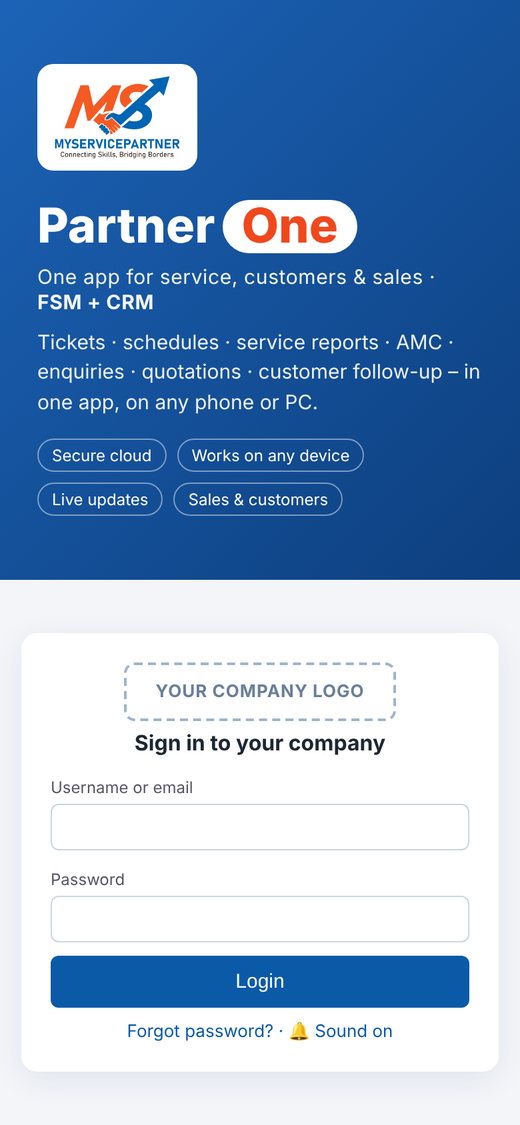
PartnerOne sign-in screen on a phone

One app

Tickets, schedule, reports, AMC, CRM and staff in one place.

Paperless

Digital job cards with photos and customer signature.

Real time

The office sees every job update as it happens.

Your brand

Your logo on login, reports and customer e-mails.

How a job flows

From the first call to a closed, signed job

01Request

Office, QR code, web form or AMC

02Approve

Priority and type of work

03Schedule

Daily plan per technician

04On site

Accept, GPS check-in, photos

05Report

Job card + customer signature

06Close

Office review, e-mail to customer

Sound familiar?

Built for teams that fix, maintain and support

Service companies

Customer requests lost between calls, e-mails and WhatsApp?

Every request becomes a ticket with a stage, priority and owner – from the first call to closure.

Book a demo →

Paper JCR / WCR

Still writing job completion reports by hand?

Technicians complete the job card on the phone with photos and the customer's signature; the branded PDF goes out automatically.

Book a demo →
Schools & campuses

Trouble managing your school's IT servicing tickets?

Staff log issues with a QR code or web form; your IT team schedules, tracks and closes every ticket.

Book a demo →
Facility & property managers

Too many AMC visits to track across buildings?

AMC contracts create planned visits automatically, with an asset register and full history per site.

Book a demo →
Key features

Everything a service business needs – in one app

1

Service tickets

  • Tickets from the office, customer QR code / web request or automatic AMC visits
  • Clear stages, priority colours, team assignment and re-assignment
  • Daily update by every technician – nothing is forgotten
  • Complete activity log: who did what and when
2

Scheduling & dispatch

  • Daily schedule board for each technician with job order
  • Preview before sending – see staff with no job or on leave
  • Technician accepts the job on the phone, with push notification
  • Move several jobs to another date in one step
3

Digital job card (JCR)

  • Before / after photos, work done, materials and remarks
  • Customer signature on the phone or by remote-sign link
  • Branded PDF report e-mailed to the customer automatically
  • Internal notes for the office – never printed for the customer
4

Projects & internal jobs

  • Project tickets with daily progress reports and summary
  • Internal jobs with reminders until they are done
  • Two-person confirmation for team jobs
  • Project and technician performance at a glance
5

CRM & sales

  • Customer and site database with map location
  • Enquiries and customer follow-up
  • Quotations: draft → approve & lock → technical document
  • Block / unblock customers with reason
6

AMC, assets & RMA

  • AMC contracts with planned visits (PPM) and automatic tickets
  • Asset register per site – system, model, serial, location
  • RMA tracking from fault to return to customer
  • Duplicate check and quick clone of assets
7

Staff & resources

  • GPS attendance – check-in away from office or site is flagged
  • Daily attendance view for all staff and morning alert
  • Leave with two-level approval and leave report
  • Weekly vehicle check (photos & video), tools and petty cash
8

Reports & control

  • Dashboards, Excel export and printable PDF reports
  • Roles plus page-by-page rights: view, create, edit, delete, print
  • Push notifications and personal reminders
  • Closed jobs locked – reopen by owner only
Built for many companies

Your brand, your data, your own login link

Your own brand

Your logo on the login page, job cards, quotations and customer e-mails sent from your own address.

Separate data

Each company has its own users, customers and records – fully separated in the database.

Own login link

Every company gets its own web address. Staff install the app on the phone home screen – no app store needed.

Technology & security

Modern, secure cloud technology

ApplicationProgressive Web App (HTML5 / JavaScript) – runs in any browser, installs like a mobile app
DatabasePostgreSQL, fully managed in the cloud (Supabase on Amazon Web Services)
HostingCloudflare global network with built-in protection against attacks
Data protectionEncrypted connection (HTTPS) and encrypted storage; passwords stored as one-way hashes
Access controlRow-level security – every request is checked on the server; each user sees only what is allowed
Backups & auditAutomatic daily backups, full data export for the owner, activity log on every record
Who is it for?

Any service team in the field

CCTV & security systemsAccess control & gate barriersIT & networkingELV & low currentMEP & facility managementHVACFire & safetySchools & campus maintenanceAny service team in the field
Pay as you go. Pay only for the users you need – no setup fee, no servers. Ask us for a live demo and a trial account.
FAQ

Common questions

Is it cloud-based?

Yes. PartnerOne runs in the cloud as a Progressive Web App. Nothing to install on servers; staff use any browser on a PC, tablet or phone and can add it to the home screen like an app.

How is it priced?

Pay as you go – you pay for the users you need, with no setup fee. Contact us for current pricing in AED or INR.

Can we use our own logo?

Yes. Your logo appears on the login page, job cards, quotations and the e-mails your customers receive.

Is our data separate from other companies?

Yes. Every company has its own users, customers and records, separated in the database with row-level security.

Can we try it first?

Yes. Ask us for a live demo and a trial account for your company.

Do technicians need a special phone?

No. Any smartphone with a modern browser works for job acceptance, GPS check-in, photos and signatures.

Book a demo

See PartnerOne working with your own data

Tell us a little about your organisation. We will arrange a short online or on-site demo, and a trial account for your company.

  • Free, no obligation
  • Online or at your office
  • Pricing for your size
WhatsApp us